SELECT Query
The SELECT statement in SQL is used to view a table and its columns. As its name suggests, it will select columns from any table. This is a common structure used in all SQL queries.
For Example
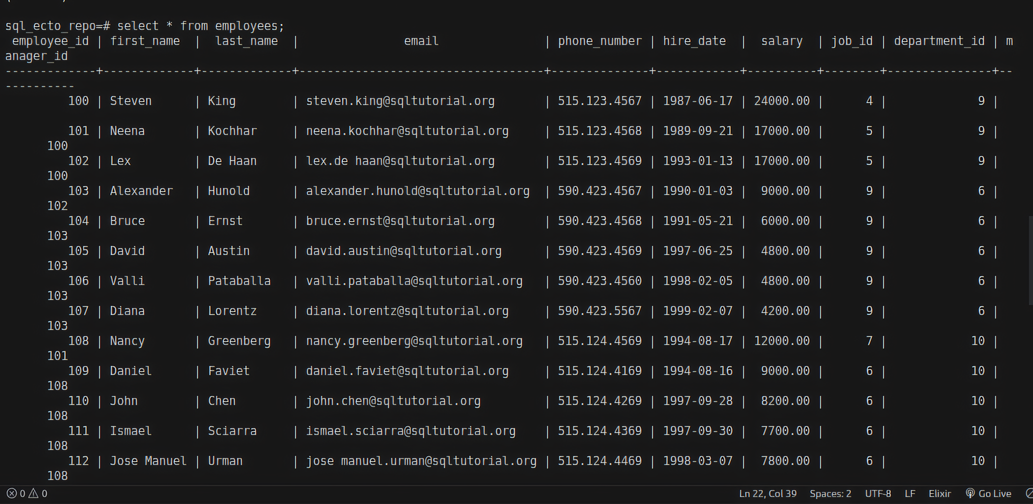
The below table is the employees table which contains all the details of employees, such as their first_name, last_name, email, phone_number, etc.
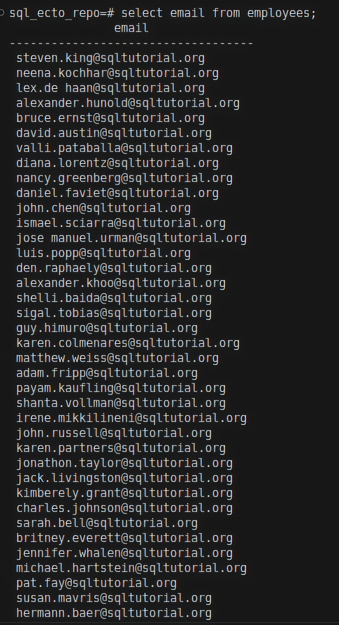
Example: select the email column from the employees table
select email from employees;
Result:
if you want to select more than one column from a table, you can use , between the column names. let's select first_name and email from employees.
Example: select the first_name and email columns from the employees table
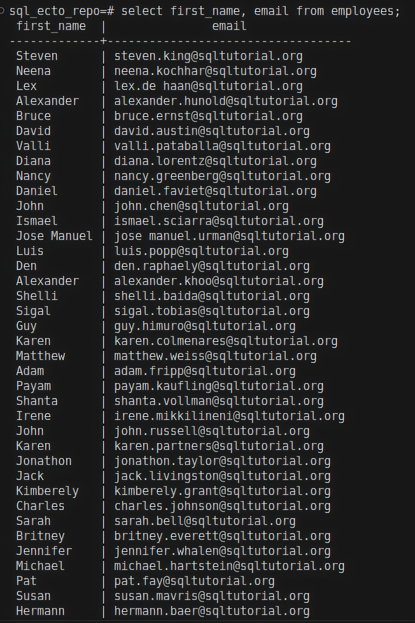
If you want to select more than one column from a table, you can use , between the column names. Let's select first_name and email from employees:
select first_name, email from employees;
Result:
Example: select all columns from the employees table
select * from employees;
Formatting convention
SQL accepts both capitalized and non-capitalized letters for queries. SQL will accept both SELECT and select. However, it is best practice to use capitalized letters as it is easily readable.
Ecto query for select
Let's see the equivalent Ecto queries to fetch all the inserted records from a schema and any particular fields from a schema.
1.Repo.all/2
Ecto provides a way to fetch all records from a schema and select specific fields.
Example: Defining the employees Schema:
defmodule HR.Employee do
	use Ecto.Schema
	import Ecto.Changeset

	@primary_key {:employee_id, :integer, autogenerate: false}

	schema "employees" do

		field :first_name, :string
		field :last_name, :string
		field :email, :string
		field :phone_number, :string
		field :hire_date, :date
		field :salary, :decimal
		field :manager_id, :integer
		field :job_id, :integer
		field :department_id, :integer

	end
end
Example: Fetching All Records with Repo.all/2
IEx(10)> HR.Repo.all(HR.Employee)
In Ecto.Repo, there is a function called Repo.all/1. It will fetch all the records from the given schema. In the above example, HR.Repo is the project's repository name. HR.Employee is the schema module name. If you put the above command, you will get a list of employee records.
Result:
IEx(21)> HR.Repo.all(HR.Employee)

[
  %HR.Employee{
    __meta__: #Ecto.Schema.Metadata<:loaded, "employees">,
    employee_id: 100,
    first_name: "Steven",
    last_name: "King",
    email: "steven.king@sqltutorial.org",
    phone_number: "515.123.4567",
    hire_date: ~D[1987-06-17],
    salary: Decimal.new("24000.00"),
    manager_id: nil,
    job_id: 4,
    department_id: 9
  },
  %HR.Employee{
    __meta__: #Ecto.Schema.Metadata<:loaded, "employees">,
    employee_id: 101,
    first_name: "Neena",
    last_name: "Kochhar",
    email: "neena.kochhar@sqltutorial.org",
    phone_number: "515.123.4568",
    hire_date: ~D[1989-09-21],
    salary: Decimal.new("17000.00"),
    manager_id: 100,
    job_id: 5,
    department_id: 9
  },
  %HR.Employee{
    __meta__: #Ecto.Schema.Metadata<:loaded, "employees">,
    employee_id: 102,
    first_name: "Lex",
    last_name: "De Haan",
    email: "lex.de haan@sqltutorial.org",
    phone_number: "515.123.4569",
    hire_date: ~D[1993-01-13],
    salary: Decimal.new("17000.00"),
    manager_id: 100,
    job_id: 5,
    department_id: 9
  },
  %HR.Employee{
    __meta__: #Ecto.Schema.Metadata<:loaded, "employees">,
    employee_id: 103,
    first_name: "Alexander",
    last_name: "Hunold",
    email: "alexander.hunold@sqltutorial.org",
    phone_number: "590.423.4567",
    hire_date: ~D[1990-01-03],
    salary: Decimal.new("9000.00"),
    manager_id: 102,
    job_id: 9,
    department_id: 6
  },
  %HR.Employee{
    __meta__: #Ecto.Schema.Metadata<:loaded, "employees">,
    employee_id: 104,
    first_name: "Bruce",
    last_name: "Ernst",
    email: "bruce.ernst@sqltutorial.org",
    phone_number: "590.423.4568",
    hire_date: ~D[1991-05-21],
    salary: Decimal.new("6000.00"),
    manager_id: 103,
    job_id: 9,
    department_id: 6
  },
  %HR.Employee{
    __meta__: #Ecto.Schema.Metadata<:loaded, "employees">,
    employee_id: 105,
    first_name: "David",
    last_name: "Austin",
    email: "david.austin@sqltutorial.org",
    phone_number: "590.423.4569",
    hire_date: ~D[1997-06-25],
    salary: Decimal.new("4800.00"),
    manager_id: 103,
    job_id: 9,
    department_id: 6
  }

<!-- and so on -->

]
2.select/3
Ecto.Query lets you write queries in two formats: expressions and keywords. Every query can be written in both formats. Keywords format is written as a key and its value. Expressions are written using its corresponding function. For example: select/3.
Expressions format
In Ecto.Query, there is a function called select/3. It is used to select particular fields from a schema. You can also select the whole schema. You have to give a structure of how you want your data to appear, such as a list, tuple, map, etc.
Example: Selecting Particular Fields Using select/3
To select specific fields using select/3:
For Example:
HR.Employee
|> select([c], [c.first_name, c.email])
|> HR.Repo.all()
Result:
IEx(23)> HR.Employee |> select([c], [c.first_name, c.email]) |> HR.Repo.all()

[
  ["Steven", "steven.king@sqltutorial.org"],
  ["Neena", "neena.kochhar@sqltutorial.org"],
  ["Lex", "lex.de haan@sqltutorial.org"],
  ["Alexander", "alexander.hunold@sqltutorial.org"],
  ["Bruce", "bruce.ernst@sqltutorial.org"],
  ["David", "david.austin@sqltutorial.org"],
  ["Valli", "valli.pataballa@sqltutorial.org"],
  ["Diana", "diana.lorentz@sqltutorial.org"],
  ["Nancy", "nancy.greenberg@sqltutorial.org"],
  ["Daniel", "daniel.faviet@sqltutorial.org"],
  ["John", "john.chen@sqltutorial.org"],
  ["Ismael", "ismael.sciarra@sqltutorial.org"],
  ["Jose Manuel", "jose manuel.urman@sqltutorial.org"],
  ["Luis", "luis.popp@sqltutorial.org"],
  ["Den", "den.raphaely@sqltutorial.org"],
  ["Alexander", "alexander.khoo@sqltutorial.org"],
  ["Shelli", "shelli.baida@sqltutorial.org"],
  ["Sigal", "sigal.tobias@sqltutorial.org"],
  ["Guy", "guy.himuro@sqltutorial.org"],
  ["Karen", "karen.colmenares@sqltutorial.org"],
  ["Matthew", "matthew.weiss@sqltutorial.org"],
  ["Adam", "adam.fripp@sqltutorial.org"],
  ["Payam", "payam.kaufling@sqltutorial.org"],
  ["Shanta", "shanta.vollman@sqltutorial.org"],
  ["Irene", "irene.mikkilineni@sqltutorial.org"],
  ["John", "john.russell@sqltutorial.org"],
  ["Karen", "karen.partners@sqltutorial.org"],
  ["Jonathon", "jonathon.taylor@sqltutorial.org"],
  ["Jack", "jack.livingston@sqltutorial.org"],
  ["Kimberely", "kimberely.grant@sqltutorial.org"],
  ["Charles", "charles.johnson@sqltutorial.org"],
  ["Sarah", "sarah.bell@sqltutorial.org"],
  ["Britney", "britney.everett@sqltutorial.org"],
  ["Jennifer", "jennifer.whalen@sqltutorial.org"],
  ["Michael", "michael.hartstein@sqltutorial.org"],
  ["Pat", "pat.fay@sqltutorial.org"],
  ["Susan", "susan.mavris@sqltutorial.org"],
  ["Hermann", "hermann.baer@sqltutorial.org"],
  ["Shelley", "shelley.higgins@sqltutorial.org"],
  ["William", "william.gietz@sqltutorial.org"]
]
Explanation
In this example, we are selecting first_name and email from the HR.Employee schema.
cis the reference variable forHR.Employee.cis used in the whole expression to refer to the schema. You can use whatever you want in this place. For example, you can also name it employee.c=HR.Employee. Refer to Aliases in Ecto to know about aliases/reference variables.- In
[c.first_name, c.email], [] - list is the data structure. You can also use tuples, keyword lists, structs.first_nameandemailare the fields. Repo.all/1will fetch the selected fields from the Database.
Example: Selecting the Whole Struct Using select/3
To select the whole struct:
HR.Employee
|> select([c], c)
|> HR.Repo.all()
Keywords format
The keyword format uses keys and their corresponding values. To select all records using the keyword format:
HR.Repo.all(from c in HR.Employee, select: c)
In this example, select: is the key, and c (the reference variable for HR.Employee) is the value.
By using these formats, you can efficiently fetch and manipulate data from your database with Ecto, mirroring the functionality of SQL queries.